CCNA Lab 6: Inter-Vlan routing and Spanning Tree Protocol
Configuración de Rapid PVST+ en una red multi vlan
September 30, 2022 · Carlos L. Ramírez
En el siguiente laboratorio se muestra el funcionamiento del protocolo Rapid Spanning Tree Protocol (Rapid PVST+) de CISCO. en una red multi-vlan, formada por varios switches tanto L2 como L2/L3.
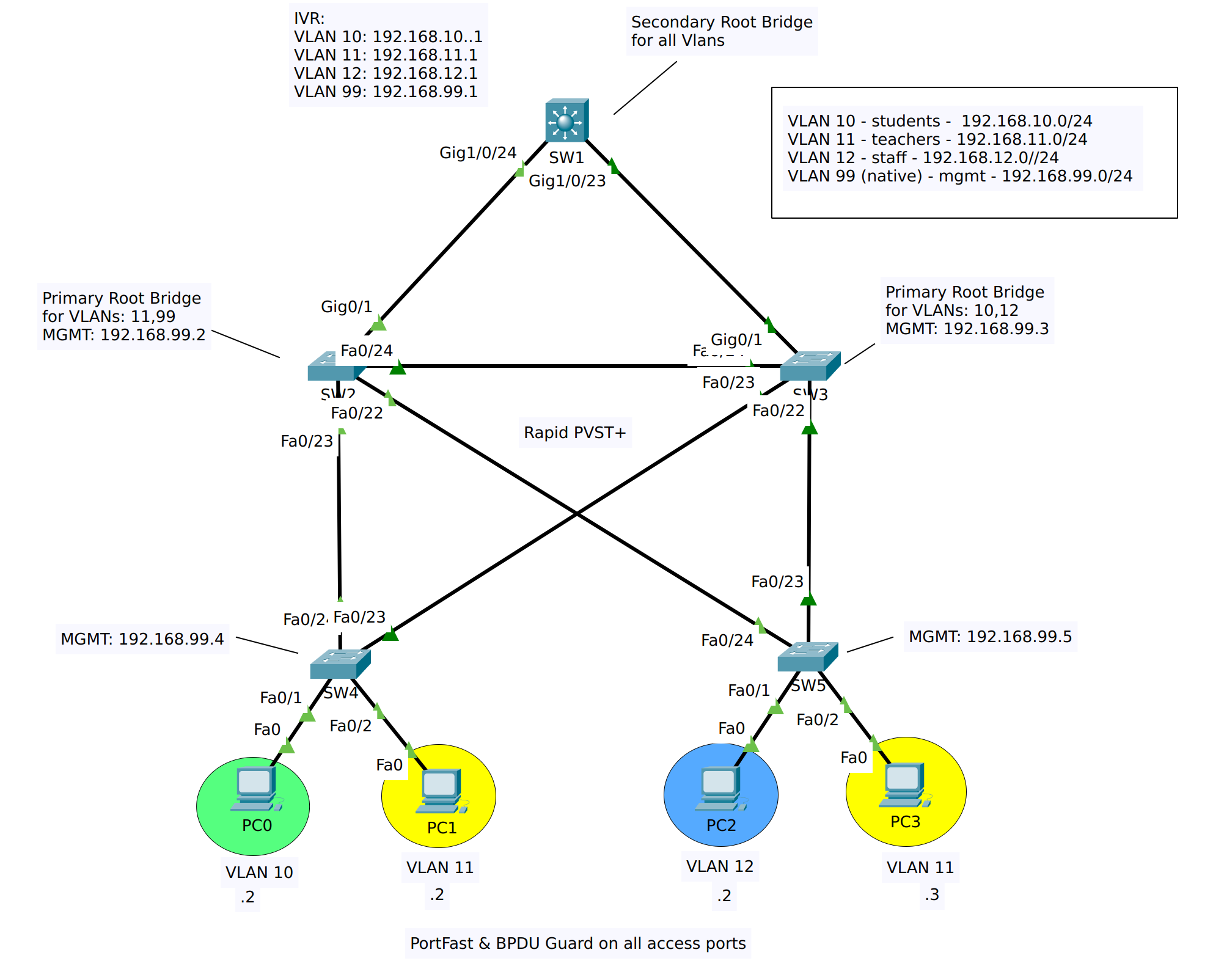
El propósito de este laboratorio es configurar una red con 3 VLANs de trafico de usuario, así como una VLAN para la administración de los equipos de red, la red se configurará para utilizar la VLAN 99 como vlan nativa y el enrutamiento inter-vlan lo realizará el SW1 por medio de SVIs.
Se deben configurar los puertos de acceso y troncales en cada switch, los enlaces troncales solo deben permitir el trafico de las vlans utilizadas en la red, y la vlan nativa sera la 99.
El protocolo STP a utilizar es Rapid PVST+, y se debe configurar el SW3 como root bridge principal para las Vlans 10 y 12, el SW2 como el bridge root principal para las Vlans 11 y 99, el SW1 debe ser el root bridge secundario para todas las Vlans.
Agregamos las VLANs en todos los switches de la red, aqui se muestra un ejemplo para SW1, sin embargo esto mismo se debe configurar en todos los switches.
Mientras realizamos la configuración de los enlaces troncales en todos los switches, nos irán apareciendo los siguiente mensajes de advertencia. Estos los podemos ignorar y deben desaparecer una vez todos los switches tengan la misma configuración.
1
2
3
4
5
4-NATIVE_VLAN_MISMATCH: Native VLAN mismatch discovered on FastEthernet0/24 (99), with SW2 FastEthernet0/23 (1).
%SPANTREE-2-RECV_PVID_ERR: Received BPDU with inconsistent peer vlan id 1 on FastEthernet0/23 VLAN99.
%SPANTREE-2-BLOCK_PVID_LOCAL: Blocking FastEthernet0/23 on VLAN0099. Inconsistent local vlan.
%SPANTREE-2-RECV_PVID_ERR: Received BPDU with inconsistent peer vlan id 1 on FastEthernet0/24 VLAN99.
%SPANTREE-2-BLOCK_PVID_LOCAL: Blocking FastEthernet0/24 on VLAN0099. Inconsistent local vlan.
Ahora verificamos el estado de los enlaces troncales luego de haber realizado la configuración en todos los switches:
 1
 2
 3
 4
 5
 6
 7
 8
 9
10
11
12
13
14
15
16
SW4#show interface trunk
Port        Mode         Encapsulation  Status        Native vlan
Fa0/23      on           802.1q         trunking      99
Fa0/24      on           802.1q         trunking      99

Port        Vlans allowed on trunk
Fa0/23      10-12,99
Fa0/24      10-12,99

Port        Vlans allowed and active in management domain
Fa0/23      10,11,12,99
Fa0/24      10,11,12,99

Port        Vlans in spanning tree forwarding state and not pruned
Fa0/23      10,11,12,99
Fa0/24      none
Primero cambiamos la version del protocolo a rapid pvst+ en toda la red, solo se muestra el SW1 pero esto mismo se debe repetir en el resto de switches
1
SW1(config)#spanning-tree mode rapid-pvst
Aqui podemos ver que SW3 es el root bridge para todas las VLANs en la topología:
1
2
3
SW3#show spanning-tree summary
Switch is in rapid-pvst mode
Root bridge for: default students teachers staff mgmt
Vamos a modificar el árbol STP asignando root bridges diferentes por vlan, según lo indicado en las instrucciones:
SW4(config)#interface r
SW4(config)#interface range f0/1-2
SW4(config-if-range)#spanning-tree portfast
%Warning: portfast should only be enabled on ports connected to a single
host. Connecting hubs, concentrators, switches, bridges, etc... to this
interface  when portfast is enabled, can cause temporary bridging loops.
Use with CAUTION

%Portfast has been configured on FastEthernet0/1 but will only
have effect when the interface is in a non-trunking mode.
%Warning: portfast should only be enabled on ports connected to a single
host. Connecting hubs, concentrators, switches, bridges, etc... to this
interface  when portfast is enabled, can cause temporary bridging loops.
Use with CAUTION

%Portfast has been configured on FastEthernet0/2 but will only
have effect when the interface is in a non-trunking mode.
SW4(config-if-range)#
SW4(config-if-range)#spanning-tree bpduguard enable
SW4(config-if-range)#exit
SW4(config)#
Con este laboratorio hemos practicado con el protocolo spanning tree, especifica mente la version rapid pvst+, de CISCO, y hemos modificado el árbol de spanning tree para poder balancear el trafico entre las diferentes vlans de la red.
Este laboratorio es el primero de una serie de 3, los laboratorios posteriores los puede encontrar aqui:
Espero que este laboratorio sea de ayuda en tu preparación para la certificación de CCNA o para aprender de redes en general. Si crees que puede ayudar a otros, por favor compártelo.
Si encuentras algún error o punto de mejora, por favor deja tus comentarios.